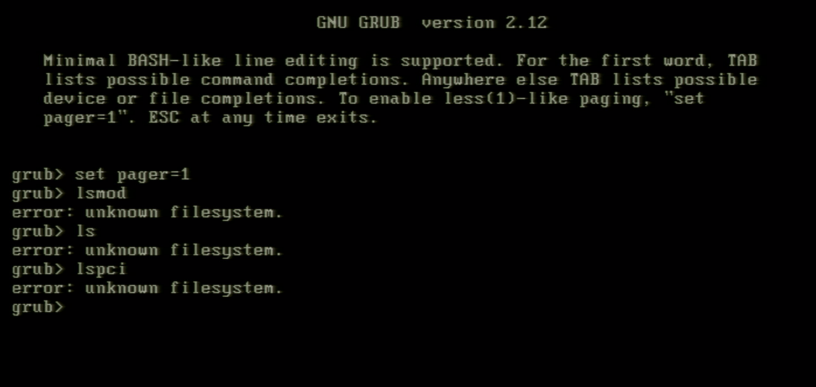
If you often set up Linux machines, there are a number of things that you basically never want to see. One of those things is “error: unknown filesystem” when loading GRUB, which means that you boot loader (literally the first thing running after your machine has finished its BIOS setup) cannot identify the filesystem of a partition you are trying to load a kernel from. Not an ideal situation!
Recently I had an issue with a server that after a kernel update—normally a rather painless endeavour—suddenly would not boot anymore, and of course I hadn’t changed anything in the configuration, neither of the kernel, nor of GRUB itself.
A lot of debugging and rescue systeming and similar shenanigans ensued (much of which can also be read on my question on askubuntu.com), and in the end the problem was the configuration of the software RAID device that GRUB was told to load its configuration from.
cat /proc/mdstats in a rescue system showed:
md2 : active raid1 sdb3[0] sda3[1]
      2111699968 blocks super 1.2 [2/2] [UU]
      bitmap: 5/16 pages [20KB], 65536KB chunk

md1 : active raid1 sdb2[2] sda2[1]
      1046528 blocks super 1.2 [2/2] [UU]
The situation was that GRUB refused to load anything from md/1, while it was perfectly able to list the contents of md/2. The configuration of those two devices held the final clue: md/2 comprises two devices, numbered 0 and 1, whereas md/1 consists of two devices numbered 1 and 2! (I did actually not spot that myself, a friend on mine who I was rubberducking with noticed it—thanks, Korkenzieher!)
Now, who would care about the device numbers? GRUB’s mdraid1x device driver, that’s who!
  if (grub_le_to_cpu32 (sb.dev_number) >=
      grub_le_to_cpu32 (sb.max_dev))
	/* Spares aren't implemented.  */
	return NULL;
This piece of code looks at the device numbers and compares them to the maximum number of devices that a RAID device has, and if you have a device numbered 2 in a RAID device with two devices, well, you obviously have spares in your configuration, and GRUB does not want to handle that, and I can kind of understand that, because there’s probably half a million of edge cases that would have to be taken into account.
Now, I’m not sure why exactly my RAID devices were configured that way, and they haven’t always been that way, because that system booted many times without any issues, but at some point I must have messed around with the RAID configuration of this particular device. 🤷 Either way, the system boots normally again, I learned a bit along the way, everybody’s happy.

Leave a Reply