Categories
gpg Security

Setting “Nice” GPG Key Expiry Dates

I’m sure you all know this issue, probably when trying to create a commit in a repository you haven’t worked in in a while:

error: gpg failed to sign the data:
[GNUPG:] KEYEXPIRED 1767198335

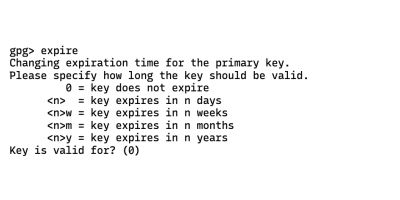
And of course you all know how to actually change the expiry date: gpg --edit-key, followed by selecting a key and using the expire command, which then presents you this prompt:

gpg> expire
Changing expiration time for the primary key.
Please specify how long the key should be valid.
         0 = key does not expire
      <n>  = key expires in n days
      <n>w = key expires in n weeks
      <n>m = key expires in n months
      <n>y = key expires in n years
Key is valid for? (0)

I don’t know about you, but my disorders can’t have keys expire at a random date in two years. My keys expire at the end of the year, but how many fucking days is that?! I don’t know, and I don’t care, and fuck you, gpg, for trying to make me figure that out!

Turns out, though, you can actually just enter a date:

Key is valid for? (0) 2026-12-31
Key expires at Do 31 Dez 12:00:00 2026 CET

I couldn’t find a way to set the time, but this is already way better than what I had to go through before.

Categories
Git Java Kotlin

Sorting Imports in the Whole Repository

Recently I was about to create an initial release for a project I have been working on for a while, and I wanted to change the package names to resemble the new context that had changed over the last two years. Using git-filter-repo it was almost trivial to change both the directory structure and every single mention of the package name. However, one of my disorders did absolutely not agree with imports now being in an incorrect order, so I sat down with git-filter-repo again and came up with the following script. This is what it does:

  1. Checking the filename. Does it end with “.kt”? If not, return, don’t change anything.
  2. Get the file’s content as a blob, turn into text, split it into lines.
  3. Go through all lines, store the package line, and store all imports.
  4. If there are no imports in this file, return the unchanged file.
  5. Sort the imports.
  6. Delete all lines from after the package line until the last import line.
  7. Now, go through the lines that are left, and once the package line is encountered, write it out, followed by an empty line, and the sorted imports; otherwise just write out the line.
  8. Join all the lines, encode them as UTF-8, create a new blob, return it.
git filter-repo --file-info-callback '
if not filename.endswith(b".kt"):
    return (filename, mode, blob_id)

text = value.get_contents_by_identifier(blob_id).decode("utf-8", errors="ignore")
lines = text.splitlines()

package_line = None
last_import = None
imports = []

for line in lines:
    if line.startswith("package "):
        package_line = line
    if line.startswith("import "):
        imports.append(line)
        last_import = line

if not imports:
    return (filename, mode, blob_id)

imports = sorted(set(imports))

package_index = lines.index(package_line)
last_import_index = lines.index(last_import)
del lines[package_index + 1:last_import_index + 1]

result = []
for line in lines:
    result.append(line)
    if line == package_line:
        result.append("")
        result.extend(imports)

final_data = ("\n".join(result) + "\n").encode("utf-8")
return (filename, mode, value.insert_file_with_contents(final_data))
'

This is all fine and dandy for Kotlin, but for e.g. Java source code, you would need a tiny bit more, because Java also has static imports, which you typically would want to sort and display separately.

git filter-repo --file-info-callback '
if not filename.endswith(b".java"):
    return (filename, mode, blob_id)

text = value.get_contents_by_identifier(blob_id).decode("utf-8", errors="ignore")
lines = text.splitlines()

package_line = None
last_import = None
imports = []
static_imports = []

for line in lines:
    if line.startswith("package "):
        package_line = line
    if line.startswith("import static "):
        static_imports.append(line)
        last_import = line
    elif line.startswith("import "):
        imports.append(line)
        last_import = line

if not imports and not static_imports:
    return (filename, mode, blob_id)

imports = sorted(set(imports))
static_imports = sorted(set(static_imports))

package_index = lines.index(package_line)
last_import_index = lines.index(last_import)
del lines[package_index + 1:last_import_index + 1]

result = []
for line in lines:
    result.append(line)
    if line == package_line:
        if imports:
            result.append("")
            result.extend(imports)
        if static_imports:
            result.append("")
            result.extend(static_imports)

final_data = ("\n".join(result) + "\n").encode("utf-8")
return (filename, mode, value.insert_file_with_contents(final_data))
'

Categories
Debugging Java

Breaking JarURLConnection

Consider the following:

URL url = new URL("jar:file:test.jar!file.txt");
String one = readStringFromUrl(url);
String two = readStringFromUrl(url);
assertThat(one, equalTo(two));

This should totally be a green test, right? And if you’re using a current Java version (like 21, or 17, hell, even 11 will do), it is a green test.

With Java 8 and a special JAR file, however, it is not… which I found out going the other way, i.e. with a test that failed with Java 11 when it was fine with Java 8.

This test created a JAR file with two files in it; both had the same name but different content. This may or may not be technically valid but it is possible to do that, by convincing Java’s JarFile (using evil reflection magic) that it has never seen the name of the file after writing it once. This specially-crafted JAR file was then handed into a ClassLoader, which was in turn used with a ServiceLoader. With Java 8, it then returned two objects, of two different classes, as expected.

(In hindsight, that expectation was… weird, to say the least, as I knew that the ClassLoader method used by the ServiceLoader returned URL objects, and I knew that the URLs it returned would be identical; why I thought they could ever yield different data, I’m not entirely sure.)

With Java 11, two objects were returned but they were both of the same class. At first I suspected that the JAR was somehow written incorrectly but could quickly verify that it was indeed very much written as intended, just like before.

The next step was to dive right into the ServiceLoader. It uses a lot of different iterators to create the iterator it returns but I finally managed to find the place where the URLs returned by the class loader were being opened, read, and parsed. The logic here changed a bit between Java 8 and Java 11 but I even after running it dozens of times in the debugger and staring at it for prolonged amounts of time I did not achieve any more clarity.

Okay, so, what about the code that reads data from the URLs? That job is delegated all the way down to a JarURLConnection (of which there are two!), and lo and behold, apparently it’s using a cache! A comparison between Java 8 and Java 11 showed that this particular code didn’t really change, though, so that cannot be the reason for the observed differences in behaviour, either.

So I dug deeper into how the URL connections were actually made, and here I finally struck gold: The implementation of ZipFile.getEntry() changed drastically between Java 8 and Java 11, from a native implementation in Java 8 to a Java-based solution. The latter uses a hash table based on the hash of an entry’s name so requesting two entries with the same name (as I did in the test) would indeed return the same entry. I am guessing that Java 8’s native implementation, when asked to locate an entry, actually locates the next entry with the given name, i.e. it did not always start at the beginning of the ZIP file’s central directory. I can’t be bothered to locate the native source code to confirm that, though.

Categories
Uncategorized

Fixing a Git Repository with Broken Links

Just the other day one of my Git repositories developed problems and did things like this:

bombe@scandium:~/git/repo> git describe next
error: Could not read 706f6f1ff3dadccab7b037736d5ebf4eeadf7ccd
fatal: No tags can describe 'b39a41ddb264bbc673d731b81897583796657eca'.

git fsck reported (among other things removed for brevity):

broken link from commit 73ba74461ca2dd1da89f322aa87035f710fe4865
to commit 706f6f1ff3dadccab7b037736d5ebf4eeadf7ccd

Fortunately, even though this commit was quite recent it was already pushed to a remote repository so the correct data had to be there. But how do I get it back?

I tried naïvely to simply remove the branch and refetch it from the remote repository but that didn’t change anything. Of course it didn’t, the broken objects would still be in Git’s object store, they are referenced from the reflog as well, and I didn’t try to fiddle around with the settings for git gc to get it to remove objects more recent than two weeks.

Browsing the list of all available commands I stumbled upon pack-objects and unpack-objects which according to their respective man pages would do what I need. I cloned the remote repository next to the broken repository and started my rescue operation, after creating a copy of my broken repository:

bombe@scandium:~/git/repo> (cd ../repo2; echo 706f6f1ff3dadccab7b037736d5ebf4eeadf7ccd | git pack-objects --stdout) | git unpack-objects
Enumerating objects: 1, done.
Counting objects: 100% (1/1), done.
Total 1 (delta 0), reused 1 (delta 0), pack-reused 0
Unpacking objects: 100% (1/1), 882 bytes | 441.00 KiB/s, done.

Well, that looked nice. Did it work? What does git fsck say?

broken link from commit 706f6f1ff3dadccab7b037736d5ebf4eeadf7ccd
to commit 0f2af3a9ceede2efed3f5a477aba1cbd7fe7f5c0

Well, that’s a success! The formerly missing/broken commit was fixed but now pointed in turn to another missing or broken commit. In my case I had to repeat above procedure a small number of times but finally git fsck was not reporting broken links anymore and every other command once again performed like I expected it to.

Categories
JPA Spring-Data

Sorting by a Non-Entity Field

In my work for SceneSat I recently came across the need to sort entries of a table by a field that does not exist in said table but is built on the fly from other fields. Specifically, depending on the status of a show I want to use either the scheduled start time or the actual start time to sort it by.

Categories
java.time Kotlin

Finding a Date From a Year and an ISO Week Number

Once a year inevitably the time arrives when you need to print a new calender for your pinboard. You know, end of february. And this year I wanted try a new layout, focused on weeks.

I vaguely remember coding some calender generator that would output a simple SVG file but for the life of me I couldn’t find it. I knew I had to have had it last year because I printed last year’s calender with it but the source code was nowhere to be found, and no combination of search phrases could make it show up.

That meant I had to solve all those tiny little problems again because no matter the API, dates are simply a horrible concept and should be abolished in favour of something simpler.

One especially pesky problem I needed to solve was to find a date given a year and an ISO week number. The only solution I could find was rather ugly:

DateTimeFormatter.ISO_WEEK_DATE
  .parse("${year}-W${"%02d".format(week)}-1")

Even though this is an incredibly terrible solution I am giving this type of calender a try this year:

If you are interested in trying it as well, grab the PDF!